Understanding Variables and Data Types in JavaScript

When writing programs, we often need a place to store information so we can use it later. Whether it's a user's name, their age, or the status of a task, programs rely on stored values to work effectively. In JavaScript, this stored information lives inside variables.
To understand variables easily, it helps to imagine a simple real-life example.
A Real-Life Analogy: Variables as Boxes
Think of a variable as a labeled box where you store information.
For example:
A box labeled name might store
"Rahul"A box labeled age might store
22A box labeled isStudent might store
true
In JavaScript, it looks like this:
let name = "Rahul";
let age = 22;
let isStudent = true;
Each variable stores a value that the program can use whenever needed.
Declaring Variables in JavaScript
JavaScript provides three keywords to declare variables:
varletconst
Each of them creates a variable, but they behave slightly differently.
Using var
var is the older way of declaring variables in JavaScript.
Example:
var city = "Delhi";
console.log(city);
Output:
Delhi
The value stored in a var variable can be changed later.
var city = "Delhi";
city = "Mumbai";

console.log(city);
Output:
Mumbai
Using let
let is the modern and commonly used way to declare variables whose values might change.
Example:
let score = 50;
console.log(score);
Output:
50
You can update the value later.
let score = 50;

score = 80;

console.log(score);
Output:
80
This makes let useful for values that may change during program execution.
Using const
const is used when a variable should not change after it is created.
Example:
const country = "India";

console.log(country);
Output:
India
If you try to change it later, JavaScript will show an error.
const country = "India";

country = "USA";
Because const variables are meant to remain constant.
Primitive Data Types in JavaScript
The values stored inside variables belong to data types. JavaScript has several primitive data types that represent basic values.
String
A string represents text.
Examples include names, messages, or addresses.
let name = "Amit";
let message = "Welcome to the website";

console.log(name);
console.log(message);
Strings are always written inside quotes.
Number
A number represents numeric values.
Examples include age, price, or quantity.
let age = 25;
let price = 199;

console.log(age);
console.log(price);
Numbers can be integers or decimals.
Boolean
A boolean represents one of two values:
truefalse
These are often used in decision-making.
let isLoggedIn = true;
let hasPermission = false;

console.log(isLoggedIn);
console.log(hasPermission);
Null
null represents an intentional empty value.
It means the variable exists but currently has no value assigned.
let selectedProduct = null;
This might happen when a user hasn’t selected anything yet.
Undefined
undefined means a variable has been declared but no value has been assigned yet.
Example:
let username;

console.log(username);
Output:
undefined
Here the variable exists, but it doesn’t hold a value yet.
Difference Between var, let, and const
These three keywords behave differently when it comes to updating values.
| Keyword | Can Reassign Value? | Modern Usage |
|---|---|---|
| var | Yes | Older JavaScript |
| let | Yes | Commonly used |
| const | No | Used for fixed values |
Example:
let age = 20;
age = 21;   // allowed

const birthYear = 2003;
birthYear = 2004; // error
Because const is meant for values that should remain unchanged.
What Is Scope?
Scope refers to where a variable can be used in a program.
In simple terms, scope determines which parts of the code can access a variable.
Imagine you are working in a company.
Some documents are private to your team
Some documents are accessible to the whole company
Variables behave similarly in programming.
Simple Scope Example
let message = "Hello World";

function showMessage() {
  console.log(message);
}

showMessage();
In this example, the function can access the message variable because it is available in that scope.
But sometimes variables are limited to a specific block of code.
{
  let city = "Delhi";
  console.log(city);
}
Inside the block, the variable works normally.
Outside the block, it cannot be accessed.
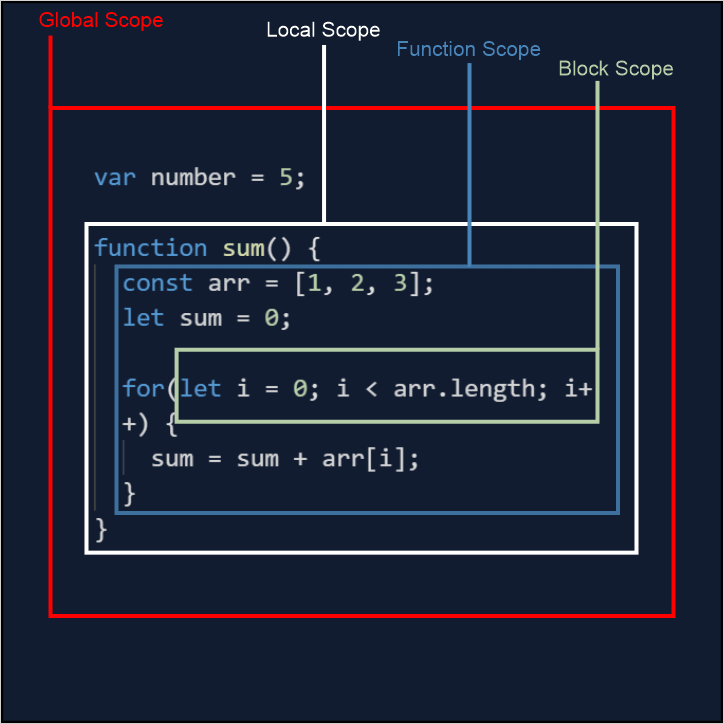
here is an another example of scope: